

概要
ダイソーでType-CのUSBハブがあったので買ってみました。
製品

こんな感じの商品です。

裏側です。連絡先がyahoo.co.jpのメールアドレスなんですね。

中身です。

裏側はツルペタでした。

電源を入れたところです。写真だとわかりにくいですが、スイッチをOFFにすると光が消えていますね。
USBデバイスツリー
上記アプリを使わせてもらいました。USBViewをベースに使いやすくなっている感じのアプリでした。
    =========================== USB Port7 ===========================

Connection Status        : 0x01 (Device is connected)
Port Chain               : 1-7
Properties               : 0x0D
 IsUserConnectable       : yes
 PortIsDebugCapable      : no
 PortHasMultiCompanions  : yes
 PortConnectorIsTypeC    : yes
ConnectionIndex          : 0x07 (Port 7)
CompanionIndex           : 0
 CompanionHubSymLnk      : USB#ROOT_HUB30#7&19be4bc&1&0#{f18a0e88-c30c-11d0-8815-00a0c906bed8}
 CompanionPortNumber     : 0x04 (Port 4)
 -> CompanionPortChain   : 2-4

      ========================== Summary =========================
Vendor ID                : 0x214B (AMECO TECHNOLOGIES (SHENZHEN) CO., LTD.)
Product ID               : 0x7250
USB version              : 2.00
Port maximum Speed       : High-Speed (Companion Port 2-4 supports SuperSpeed)
Device maximum Speed     : High-Speed
Device Connection Speed  : High-Speed
Self Powered             : yes
Demanded Current         : 100 mA
Used Endpoints           : 2

      ========================== USB Hub =========================

        +++++++++++++++++ Device Information ++++++++++++++++++
Device Description       : 汎用 USB ハブ
Device Path              : \\?\USB#VID_214B&PID_7250#5&11286cac&0&7#{f18a0e88-c30c-11d0-8815-00a0c906bed8} (GUID_DEVINTERFACE_USB_HUB)
Kernel Name              : \Device\USBPDO-14
Device ID                : USB\VID_214B&PID_7250\5&11286CAC&0&7
Hardware IDs             : USB\VID_214B&PID_7250&REV_0100 USB\VID_214B&PID_7250
Driver KeyName           : {36fc9e60-c465-11cf-8056-444553540000}\0009 (GUID_DEVCLASS_USB)
Driver                   : \SystemRoot\System32\drivers\UsbHub3.sys (Version: 10.0.19041.264  Date: 2020-12-23)
Driver Inf               : C:\WINDOWS\inf\usbhub3.inf
Legacy BusType           : PNPBus
Class                    : USB
Class GUID               : {36fc9e60-c465-11cf-8056-444553540000} (GUID_DEVCLASS_USB)
Service                  : USBHUB3
Enumerator               : USB
Location Info            : Port_#0007.Hub_#0001
Location IDs             : PCIROOT(0)#PCI(1400)#USBROOT(0)#USB(7), ACPI(_SB_)#ACPI(PCI0)#ACPI(XHC_)#ACPI(RHUB)#ACPI(HS07)
Container ID             : {908429d0-a4bc-11eb-aabc-5c80b6f5473f}
Manufacturer Info        : (標準 USB ハブ)
Capabilities             : 0x84 (Removable, SurpriseRemovalOK)
Status                   : 0x0180600A (DN_DRIVER_LOADED, DN_STARTED, DN_DISABLEABLE, DN_REMOVABLE, DN_NT_ENUMERATOR, DN_NT_DRIVER)
Problem Code             : 0
Address                  : 7
HcDisableSelectiveSuspend: 0
EnableSelectiveSuspend   : 0
SelectiveSuspendEnabled  : 0
EnhancedPowerMgmtEnabled : 0
IdleInWorkingState       : 1
WakeFromSleepState       : 0
Power State              : D2 (supported: D0, D1, D2, D3, wake from D0, wake from D1, wake from D2)

        +++++++++++++++++ Registry USB Flags +++++++++++++++++
HKEY_LOCAL_MACHINE\SYSTEM\CurrentControlSet\Control\usbflags\214B72500100
 osvc                    : REG_BINARY 00 00
 NewInterfaceUsage       : REG_DWORD 00000000 (0)

        ------------------- USB Hub Descriptor -----------------
bDescriptorLength        : 0x09 (9 bytes)
bDescriptorType          : 0x29 (Hub Descriptor)
bNumberOfPorts           : 0x04 (4 Ports)
wHubCharacteristics      : 0x00E0
 Power switching         : Ganged
 Compound device         : No
 Over-current protection : Global
 TT Think Time           : At most 32 FS bit times
 Port Indicators         : Supported
bPowerOnToPowerGood      : 0x32 (100 ms)
bHubControlCurrent       : 0x64 (100 mA)
DeviceRemovable          : 0x00
 Bit 0                   : 0 (reserved, any value)
 Bit 1                   : 0 (Device at Port 1 is removable)
 Bit 2                   : 0 (Device at Port 2 is removable)
 Bit 3                   : 0 (Device at Port 3 is removable)
 Bit 4                   : 0 (Device at Port 4 is removable)
 Bit 5                   : 0 (unused, must be 0)
 Bit 6                   : 0 (unused, must be 0)
 Bit 7                   : 0 (unused, must be 0)
PowerControlMask         : 0xFF
Data (HexDump)           : 09 29 04 E0 00 32 64 00 FF                        .)...2d..
HubIsBusPowered          : 0x00 (Self Powered)

      ---------------- Extended USB Hub Descriptor ---------------
HubType                  : 0x02 (Usb20Hub - hub descriptor is defined in USB 2.0 and 1.1 specifications)
HighestPortNumber        : 0x04 (4 Ports)
UsbHubDescriptor         : identical with "USB Hub Descriptor" shown above
Data (HexDump)           : 09 29 04 E0 00 32 64 00 FF                        .)...2d..

        ----------------- USB Hub Capabilities ----------------
HubIs2xCapable           : 1 (Is 2.x capable)
Data (HexDump)           : 01 00 00 00                                       ....

        --------------- USB Hub Capabilities Ex ---------------
HighSpeedCapable         : 1 (Yes)
HighSpeed                : 1 (Yes)
MultiTtCapable           : 0 (No)
HubIsMultiTt             : 0 (No)
ArmedWakeOnConnect       : 0 (No)
IsBusPowered             : 0 (No)
IsRoot                   : 0 (No)
Data (HexDump)           : 03 00 00 00                                       ....

        ---------------- Connection Information ---------------
Connection Index         : 0x07 (Port 7)
Connection Status        : 0x01 (DeviceConnected)
Current Config Value     : 0x01 (Configuration 1)
Device Address           : 0x0D (13)
Is Hub                   : 0x01 (yes)
Device Bus Speed         : 0x02 (High-Speed)
Number Of Open Pipes     : 0x01 (1 pipe to data endpoints)
Pipe[0]                  : EndpointID=1  Direction=IN   ScheduleOffset=0  Type=Interrupt
Data (HexDump)           : 07 00 00 00 12 01 00 02 09 00 01 40 4B 21 50 72   ...........@K!Pr
                           00 01 00 01 00 01 01 02 01 0D 00 01 00 00 00 01   ................
                           00 00 00 07 05 81 03 01 00 0C 00 00 00 00         ..............

        --------------- Connection Information V2 -------------
Connection Index         : 0x07 (7)
Length                   : 0x10 (16 bytes)
SupportedUsbProtocols    : 0x03
 Usb110                  : 1 (yes, port supports USB 1.1)
 Usb200                  : 1 (yes, port supports USB 2.0)
 Usb300                  : 0 (no, port not supports USB 3.0) -> but Companion Port 2-4 does
 ReservedMBZ             : 0x00
Flags                    : 0x00
 DevIsOpAtSsOrHigher     : 0 (Device is not operating at SuperSpeed or higher)
 DevIsSsCapOrHigher      : 0 (Device is not SuperSpeed capable or higher)
 DevIsOpAtSsPlusOrHigher : 0 (Device is not operating at SuperSpeedPlus or higher)
 DevIsSsPlusCapOrHigher  : 0 (Device is not SuperSpeedPlus capable or higher)
 ReservedMBZ             : 0x00
Data (HexDump)           : 07 00 00 00 10 00 00 00 03 00 00 00 00 00 00 00   ................

    ---------------------- Device Descriptor ----------------------
bLength                  : 0x12 (18 bytes)
bDescriptorType          : 0x01 (Device Descriptor)
bcdUSB                   : 0x200 (USB Version 2.00)
bDeviceClass             : 0x09 (Hub)
bDeviceSubClass          : 0x00
bDeviceProtocol          : 0x01 (Hi-speed hub with single TT)
bMaxPacketSize0          : 0x40 (64 bytes)
idVendor                 : 0x214B (AMECO TECHNOLOGIES (SHENZHEN) CO., LTD.)
idProduct                : 0x7250
bcdDevice                : 0x0100
iManufacturer            : 0x00 (No String Descriptor)
iProduct                 : 0x01 (String Descriptor 1)
iSerialNumber            : 0x00 (No String Descriptor)
bNumConfigurations       : 0x01 (1 Configuration)
Data (HexDump)           : 12 01 00 02 09 00 01 40 4B 21 50 72 00 01 00 01   .......@K!Pr....
                           00 01                                             ..

    ------------------ Configuration Descriptor -------------------
bLength                  : 0x09 (9 bytes)
bDescriptorType          : 0x02 (Configuration Descriptor)
wTotalLength             : 0x0019 (25 bytes)
bNumInterfaces           : 0x01 (1 Interface)
bConfigurationValue      : 0x01 (Configuration 1)
iConfiguration           : 0x00 (No String Descriptor)
bmAttributes             : 0xE0
 D7: Reserved, set 1     : 0x01
 D6: Self Powered        : 0x01 (yes)
 D5: Remote Wakeup       : 0x01 (yes)
 D4..0: Reserved, set 0  : 0x00
MaxPower                 : 0x32 (100 mA)
Data (HexDump)           : 09 02 19 00 01 01 00 E0 32 09 04 00 00 01 09 00   ........2.......
                           00 00 07 05 81 03 01 00 0C                        .........

        ---------------- Interface Descriptor -----------------
bLength                  : 0x09 (9 bytes)
bDescriptorType          : 0x04 (Interface Descriptor)
bInterfaceNumber         : 0x00
bAlternateSetting        : 0x00
bNumEndpoints            : 0x01 (1 Endpoint)
bInterfaceClass          : 0x09 (Hub)
bInterfaceSubClass       : 0x00
bInterfaceProtocol       : 0x00
iInterface               : 0x00 (No String Descriptor)
Data (HexDump)           : 09 04 00 00 01 09 00 00 00                        .........

        ----------------- Endpoint Descriptor -----------------
bLength                  : 0x07 (7 bytes)
bDescriptorType          : 0x05 (Endpoint Descriptor)
bEndpointAddress         : 0x81 (Direction=IN EndpointID=1)
bmAttributes             : 0x03 (TransferType=Interrupt)
wMaxPacketSize           : 0x0001
 Bits 15..13             : 0x00 (reserved, must be zero)
 Bits 12..11             : 0x00 (0 additional transactions per microframe -> allows 1..1024 bytes per packet)
 Bits 10..0              : 0x01 (1 byte per packet)
bInterval                : 0x0C (12 ms)
Data (HexDump)           : 07 05 81 03 01 00 0C                              .......

    ----------------- Device Qualifier Descriptor -----------------
Error                    : ERROR_GEN_FAILURE

      -------------------- String Descriptors -------------------
String descriptors are not available  (because the device is in low power state)
ベタッと貼り付けます。標準 USB ハブとして認識され、VIDが214B、PIDが7250ですね。内容的にはUSB2.0の4ポートハブで100mAまでの電流をサポートしています。100mAまでなので充電には使えないと記述されていますね。
使ってみた
WindowsパソコンのType-CにこのUSBハブを接続し、M5StickCとM5Stack Core2を接続したところちゃんと認識しました。M5Burnerで書き込みもできましたのでType-CしかないノートパソコンでM5StickCの開発をするときには便利かもしれません。
最近の開発ボードはType-Cのものが増えましたが、正しくType-Cを実装していないものが多いです。M5Stackの場合にはM5StickCの初期バージョンの実装がおかしく、Type-Cケーブルだと認識しません。
通常USBケーブルで接続をするとボードの電源が自動的に入るのですが、入らないM5StickCは対応前のバージョンとなります。見た目で区別する方法としては5V INの端子が赤色だと対策前で、青色だと対策後の物が多いと思います。すでに一年以上前に対策されていますので、現在販売しているものはすべて青バージョンだと思います。(いろいろバージョンがあるので、赤でも対応済みがあるかもしれません)

分解してみた

最初は爪かなと思ったのですが、違いました。ヨコがわりと隙間があるのでそこに細い板を突っ込んでこじって四隅を引き上げます。

開きました。四隅と真ん中に固定用の穴がありました。ここを外すようにこじるのがいいと思います。

表面です。片面基板ですね。

使っているスイッチはこんな感じでした。スイッチは2ピンでしたので、単純なオン・オフですね。

基板はこんな感じでした。スイッチの接点をみたところVCCのみスイッチオフで切り離していました。他のGNDとD+とD-は配線されたままですね。
ICはちょっと傷つけてしまったので型番読めず。。。あっマイクロスコープで調べればよかったけれど、このブログでは細かい部品特定まではやらないので良しとしよう。。。
まとめ
一つもっていてもいいかなって金額の商品です。
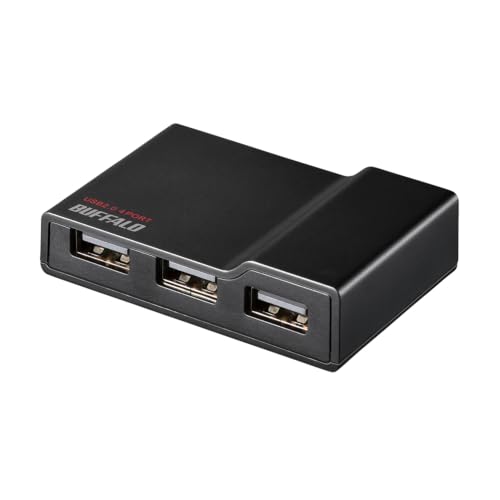


現状は似たような安いType-Cのハブに、上記のようなACアダプター付きのハブをぶら下げて使っています。安いType-Cのハブにたくさんぶら下げると電源が足りなくなるのですが、実際に使う機材にはACアダプター付きのものを用意しているとかなり安定します。
USB2.0のハブなので速度はでないですが、USB HDDなどの速度が必要なものは本体に直結するので、マイコン開発とかであればUSB2.0までで問題ありません。


コメント